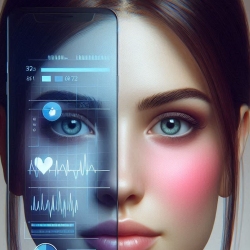
Yes, you heard right. The app will actually be the prescription. A digital prescription. Sort of.
This past week Click Therapeutics reached a milestone when the FDA approved their application for their digital app, currently known as CT-132. It’s an app specifically designed to treat migraine.
No, you don’t inject yourself with it or hold the phone close to your head to make it vibrate. It’s actually more about helping you with lifestyle changes. Yes, we’ve seen things like this before, but this is a specific app that has gone through clinical trials.
This isn’t Click Therapeutics’ first app. They already have an app available for major depressive disorder, known as Rejoyn. The official website explains: “Rejoyn, when used alongside your antidepressant medication, can help you treat depression symptoms differently. It is authorized by the FDA and provides 6 weeks of brain-training exercises and short skills-based therapy lessons.”
They also have an app for type 2 diabetes. And more to come, but the migraine one is coming soon.
We can expect to see more apps of this type coming.
One of the important measurements for an app of this kind is whether or not people will use it, and keep on using it. Only after that can we measure whether or not it’s helping. CT-132 seems to check both boxes, after a few weeks in the trials.
Of course, this is bit of a different kind of thing to test, when we compare it to taking a pill. But so far it does seem to help. But the real trial will come when it’s available and people in the real world start using it.
There are a host of available apps available to remind you to take your meds. Every one of them has its pros and cons. But here are a few to consider…
First, I should note that although I use a ridiculous amount of apps on my phone, I hate to add another app that can do something that I can already do with an app I already own.
If you have an app for your to-do lists, or a calendar, or even a notebook app that allows reminders (such as Evernote), you can set it up to remind you to take your medications. Apple’s Health app also has a medication reminder feature.
Second, I should admit that I’m not fond of subscription apps. I know why they exist, it entirely makes sense as a business model, but I just don’t have the cash to keep doling out more each month. But more power to you if you find the perfect subscription app.
For example, for years I used Medisafe Pill Reminder, and it’s excellent. I recommend it. But when it went to a subscription model, I began looking elsewhere.
There are also specific migraine trackers, that can track the medication you take, and even remind you to take preventatives. N1-Headache is one of these – an excellent app that especially excels in finding your true triggers. We’ve talked about it before – also highly recommended.
If, however, you want something more focused on medications, here are a couple of suggestions. I should also add that I’ve used apps like these for family medications. If you want to keep track of a parent’s meds or a child’s or whatever, this is the way to go.
MyTherapy Medication Reminder is a highly customizable medication reminder. You can add personal notes, get reminders when you need refills, “game-ify” your treatment by earning rewards, and even track symptoms and general health information. Also, you can easily export information for your doctor.
This much ability to add information and customize means that you could actually track things like headache level, giving you a lighter-weight way to track all meds but also specifically some headache info.
But the app that I’ve settled on at this point in my life is Pill Reminder – All in One. This is an extremely flexible app in which you can add multiple users, multiple medications (including abortive “as needed” meds – perfect for migraine), unique sounds for your alerts (which I really like), and easy-to-read views. It also has many of the additional features I mentioned for the previous app, such as exporting information for your doctor.
This one has a very small one-time cost if you want to add more than two alerts.
And here’s another bonus – no data is collected at all from this app. Privacy is a priority.
There’s no reason why you can’t download a couple of these and try them out to see what works best for you.
If you’ve found something else you love, leave a comment!
The prediction and diagnosis of migraine is changing fast, although in some ways it’s not changing at all.
Since the dawn of time, patients and doctors have been able to predict headache attacks to a certain extent, and to notice what prevents them or triggers them.
But then along came more sophisticated computers. The computer can analyze large amounts of data all at the same time, in a way a human can’t. As long as it’s fed numbers, it can search for patterns. Huge medical studies have shown us new patterns that we never would have noticed as humans, even if we had collected all the information together.
Then along came the ubiquitous smart and surveillance devices. The ease with which we can take certain measurements of ourselves and others means more data for the computers, and so the discovery of new patterns.
So ever since the smartphone came along, developers have been trying to come up with apps that could predict migraine attacks, identify triggers, and even recommend personalized treatments. An early success what N1-Headache, formerly Curelator, which began to question some common beliefs about migraine triggers.
One area of interest that you need to know about is rPPG – that is, (brace yourself), remote photoplethysmography.
So imagine this. You’re on a video chat with someone, and their computer is actively analyzing the video feed. On the other end, information starts popping up on the other person’s screen:
This person is nervous about what you just said.
This person will probably have a migraine attack within the next 24 hours.
This person is at high risk of [a certain disease]
Or perhaps you’re not even on a video chat. Maybe there just happens to be another camera in the room, watching you. Or maybe a computer is going over your social media posts and photos.
Remote photoplethysmography is one method of measuring visible changes in your body, such as in your cardiovascular system.
Now I’ve started out presenting this in a rather negative light. The positives are obvious for you personally, and for the medical community. Gathering huge amounts of data about migraine patients will hopefully lead to some leaps forward in migraine treatments.
Collection of personal data can help you customize your own treatment, and sharing that data – even anonymously – can help you compare your situation to other similar patients. This is much more powerful that an online forum where you meet someone with similar symptoms!
The use of AI to go through the huge amounts of data out there is a developing area of research, as you can see for yourself with a quick search online. Although in many ways it’s not so new, it is becoming much more powerful. How will you use it? How might you try to limit the sharing of your data, or do you care? It’s time to think all this through, because the future is here.
Today I was reading an article related to headache, and I’m pretty sure it was written by AI, even though the author’s name was right there.
It was rather vague and not particularly helpful. But the day is coming – perhaps is already here – when AI-written content will, at times, be extremely helpful. Of course, it all depends on the programmer, and whoever gave the AI its prompt, and – well, the accuracy of the sources that the AI is drawing from.
Sometimes helpful and sometimes not helpful, AI has become a regular part of life for most of us, along with many apps and data-sharing services and video conferences – and that brings us to our term of the day: DTx.
DTx is more and more of a reality for headache sufferers. It stands for Digital Therapeutics.
Why the x? Well, that’s a long story, as it turns out. You might be familiar with Rx, which refers to a medical prescription. Rx is short for the Latin term recipere (which is where our word “recipe” comes from), which means “take!” Sometimes it would be shortened as Rc, which makes a lot more sense. But there was a habit of crossing the letter to show it was abbreviated – like this: ?. Sorry, just a little history for you there.
DTx is a term that refers to a whole lot at this point. The term was coined back in 2012, and generally refers to treatments that use software/applications/programming and data-sharing (such as over the internet). Proponents, such as the Digital Therapeutics Alliance, want to emphasize that these are evidence-based treatments and tools. In that case, the little app you downloaded that someone invented to make a buck, but that really doesn’t work, would not be included.
Headache and migraine patients are perhaps already familiar with some of these. Let’s list a few:
Nerivio, the migraine patch that comes with an app
We could, of course, go on and on! (And it looks like it might be time for some more app reviews.)
Of course, different people define DTx differently, from the wider use of anything digital that you use for your health, to stricter definitions that refer to therapies specifically approved by regulatory organizations. (For an interesting look at the history of DTx, see Role of digital therapeutics and the changing future of healthcare.)
DTx makes a lot of promises. More patient control, ability to track and understand information from home, access to specialists who aren’t nearby, more detailed information.
But there are challenges as well. It’s nice that I can “visit” a specialist in another state, but we all know that there’s a lot that doctors can tell about you in person that they can’t see on a screen. Also, that specialist still only has so much time – what we really need are more trained specialists!
Privacy is another issue. Yes, it’s important to check out how a company will use your information and how secure it is. But as soon as it’s in digital form on a connected device, there’s a chance that it can be accessed by someone else. In fact, there are ways to hack your device so that someone can even tell what you’re typing. “I have nothing to hide” is a phrase used by those who need to learn the many ways that their information can be used against them.
Another concern is just how useful a DTx is (hence “evidence-based”). A “neat-o” device or app may seem great, but it may simply end up as wasted time and more screen time.
One more issue is deciding where to put all your information. You don’t want to waste your doctor’s time (or your own!) with reams of information from 6 different apps. So effectively using digital technology may require some organization on the part of the user.
It’s certainly true that, in the middle of a moderate to severe migraine attack, most of us will not be sitting at the computer. However, migraine patients can be sensitive to light at other times too. And so many of us are making use of “dark modes” on our devices.
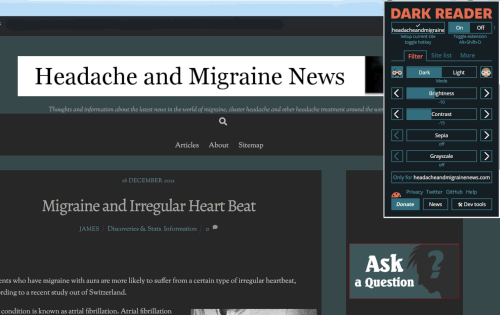
Testing Dark Reader at Headache and Migraine News
We’ve talked about various options for improving the light of screens – including Iris, which cuts down on blue light in a very clever way.
But if you want to take “dark mode” to the next level in your browser, check out Dark Reader. Dark Reader aims to give you “Dark mode everywhere”, so that your experience with Google, Wikipedia, Amazon, Facebook, Fandom, Yelp – is a lot less bright.
Darkness, contrast, and even sepia can be controlled across all websites, or specific domains. Dark Reader is open source, and free (with a small one-time price for an iOS app).
You may find, as I did, that Dark Mode takes a little fiddling to get started. Make the icon is visible on your browser, and then play around with the settings for each site you want to control. There is a help page here.
Actually, the way that Dark Mode really stands out from the crowd is its contrast and “Light Mode”, believe it or not. Sometimes with dark modes, you’re stuck with a nice dark screen, but then you have bright white text. You can work around that using Dark Reader. For example, you can dim the whites, and still have black text.