Do I need an EEG?
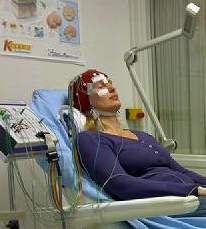
Having an EEG
Photo courtesy of zwolle
An Electroencephalography, otherwise known as an EEG, is a way to measure the electrical activity of the brain (sometimes called brainwaves, though this is not technically correct). Sometimes headache and migraine patients have EEGs done. Should you?
If you’re hoping to positively diagnose your migraine or headache, and EEG probably won’t be a help. Although we have learned a lot about migraine from EEGs, and have noticed abnormal patterns in some people, there is no “common pattern” in everyone. In other words, an EEG probably won’t prove anything. It’s useful to help researchers understand migraine, but not particularly useful in helping individual migraine patients.
There are, however, some cases where an EEG is helpful. EEGs have been used in cases of hemiplegic migraine and basilar migraines, for example.
But EEGs have also been useful because of the close relationship between epilepsy and migraine. Sometimes migraine can be mistaken for epilepsy, and vice versa. An EEG is much more useful in confirming whether or not epilepsy is a cause of the symptoms. Some researchers even use the term migralepsy for a rare disorder that seems to combine the two.
But in this case an EEG will only be ordered if there is reason to believe (from observation) that epilepsy may be a cause of the symptoms.
In the end, in the majority of cases an EEG won’t confirm anything. Observation and response to treatment are far more valuable methods of diagnosis.